

MB WhatsApp (MBiOS)
Download Official MBiOS APK
Latest Version 2026
Fast Download APK CM Security
 Lookout
 McAfee
Download the official MBWhatsApp APK latest version for Android. Created by Stefano YG [MBMods], MBiOS delivers an iOS-style design and premium features on Android.
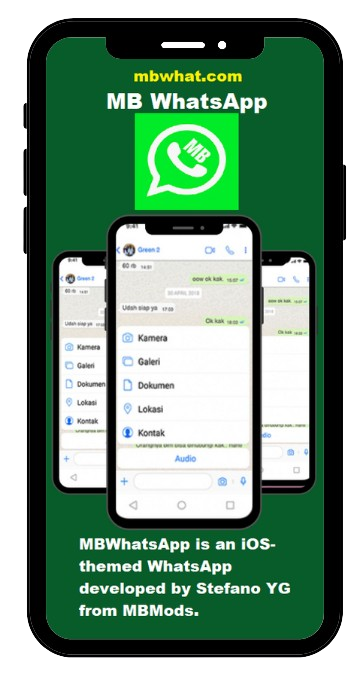
MB WhatsApp - Everything You Need to Know
Day-to-day messaging feels almost second-nature, yet many users still eye the standard WhatsApp interface and imagine something a little more flexible. Scrolling through a sparse settings menu after a privacy scare leaves that wish fresh in the mind. From the back alleys of open-source development, MB WhatsApp now steps into the conversation.
This unofficial variant of the evergreen platform bundles in extra customization, layered privacy toggles, and a broader slate of sharing options. For people who tinker for pleasure rather than out of necessity, it instantly feels less like an app and more like a toolkit.
Jumping into the nuts and bolts is easy enough because the entry point rarely demands advanced expertise. One guide later, even the mildly curious can wrap their head around installation quirks, feature overhauls, and the diffs that separate mb whatsapp ios from its more mainstream sibling. Simple prose keeps the list manageable-sized screens in mind.
Visit our website:
geometry dash apk
New Features




Enhanced Privacy Settings
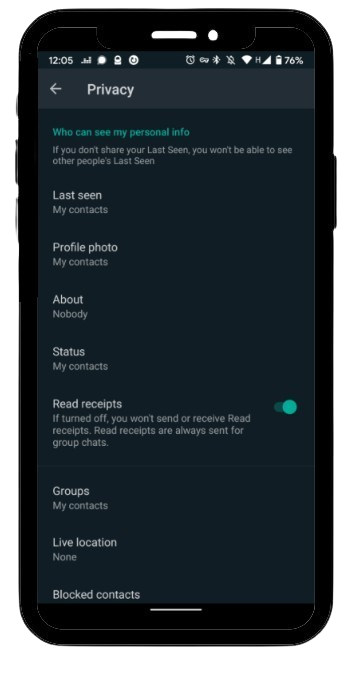
An optional toggle lets users suppress the visible online indicator, thus permitting browsing without scrutiny. The familiar blue checkmarks can be disabled, which enables silent message previews. A built-in anti-delete mechanism archives even those texts that the sender retracts. For users who desire tighter control, chats can be shielded behind a passcode or biometric lock.
Customization Options
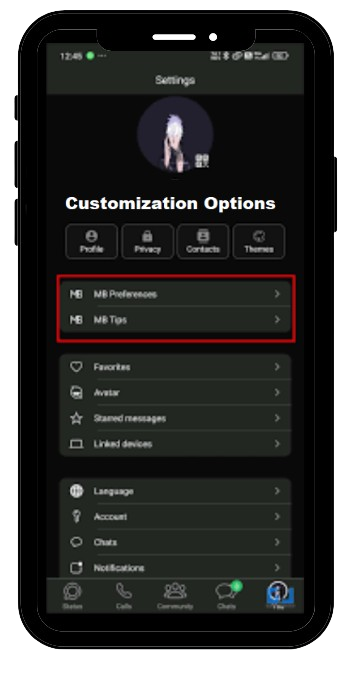
Themes are modular; one tap can shift hues across the interface. Fonts are user-selectable, allowing for everything from serif elegance to digital compactness. Balloon shapes and application icons are further customizable, with dozens of libraries to sample.
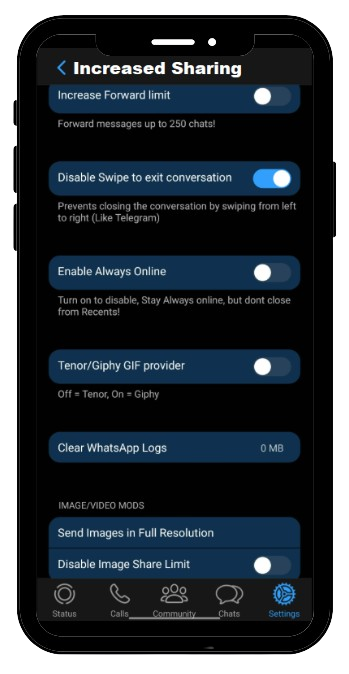
Increased Sharing Limits
File transfers cap at 100 megabytes, accommodating longer videos or large reports. Rostered pictures can number as many as ninety in a single send, tripling the native ceiling.
Frequently Asked Questions

What is MB WhatsApp?
At its core, MB WhatsApp represents a reverse-engineering project aimed at widening the feature set of the default client. Casual description often stops there, and serious users hear the phrase modded and immediately think sandbox-like control.
Menu items that let folks mask blue ticks, push the upload cap past the usual limits, or remix theme colors pile up at a noticeable rate. By design, each single toggle whispers to individual users, You steer this, not the default terms of service.
Because the file lives outside the formal Google Play ecosystem, sideloading becomes a soft prerequisite. Skeptics usually pause at that step, while experimenters brush it off as the smallest hassle in exchange for the extra freedom.
To install MBWhatsApp APK, you will first download the APK from a reputable repository such as mbwhat.com. Exercise standard caution; a trusted source minimizes the risk of bundled malware.
MB WhatsApp: A Feature Overview
Many reviewers claim that MB WhatsApp eclipses the stock client, largely on account of its extras and refinements. The heading menus below summarize the highlights.
Advanced Messaging Features
A timer-based scheduler allows messages to launch at user-defined moments, regardless of the sender's availability. Auto-reply scripts deliver preset responses whenever the owner is occupied or traveling.
One-Tap Translation
A quick tap prompts MBWhatsApp to render any message in the language of your choice.
Media Management
Save someone else's profile photo, status update, or video clip straight to your phone without a middle step.
Glance through shared images and recordings on the fly; no formal download is required.
Multi-Account Capability
Keep a personal and a work number active side by side, courtesy of the apps dual-account functionality.
That flexibility makes MB WhatsApp APK stand out in a crowded messaging market.
Recently Added Enhancements
Beyond its core toolkit, MB WhatsApp rolls out upgrades that advance usability.
Built-In Anti-Ban
The dev team has implemented an obfuscation layer designed to shield accounts from WhatsApps detection engines. Peace of mind comes at no extra configuration cost.
System-Wide Dark Theme
Users who favor low-light screens can engage a native dark mode that lessens glare after sunset.
Expanded Chat Pinning
Where stock WhatsApp permits three pinned threads, this variant stretches the limit to one hundred. Important conversations remain accessible with minimal scrolling.
User-Controlled Backups
Text logs, voice notes, and media can be archived or reinstated in a few taps, assuring that no history evaporates during a reinstall or phone change.
Language Support
MB WhatsApp accommodates speakers of many tongues, a feature that broadens its appeal across continents and cultures. Its interface adjusts seamlessly, allowing users to converse in the language they feel most comfortable with.
How to Install MBWhatsApp APK on Android?
Installing the MBWhatsApp APK Download on an Android device is less complex than it appears at first glance; following a straightforward sequence of actions clears the hurdles.
Step 1: Enable Unknown Sources
- The typical safeguards block any software not distributed through the official Play Store, so users must briefly lower that gate.
- Head into your phones Settings.
- Locate either Security or Privacy, depending on the device skin.
- Flip the toggle for Install Apps from Unknown Sources to the active position.
Step 2: Download the APK File
- Open a browser and navigate to mbwhat.com, where the current build of MB WhatsApp resides.
- Confirm that the host site is reputable, as rogue APKs can carry hidden dangers.
Step 3: Locate the File
Once the retrieval finishes, slide into the Downloads directory; the filename will conventionally end with .apk.
Step 4: Install the App
- Strike the APK name to trigger the installation routine.
- Approve any permissions the prompt outlines, and the system will place the application icons on the home screen.
Step 5: Set Up Your Account
- Open the new app once the procedure concludes.
- Supply your mobile number for SMS-based verification.
- If migrating from the stock WhatsApp client, permit the restoration wizard to reinstate previous conversations and media.
Step 6: Enjoy!
Dive into MB WhatsApps many capabilities and savor the freshly polished messaging environment. Discover themes, fonts, and privacy toggles that all wait for a quick tap.
Note: Routine updates still matter; they fix glitches and roll out the newest tools. A once-a-month check usually suffices.
Conclusion
MB WhatsApp stands apart from the stock messenger by granting a broad range of tweaks, stronger privacy meters, and extra features. The clean interface and responsive design keep the heftiest options approachable.
Fans of bespoke apps or anyone craving tighter control over their chats should experiment with this fork. For a firsthand look, grab the latest APK at mbwhat.com.